Wednesday, July 4, 2012

EPI #11: Movement

Now that my roadblocks related to determining game state and handling MapEntitys are all taken care of, it's time draw the PC and the MapEntity to the map, and make the PC move around.  In order to do this, I need to:
  1. Load config.ini
  2. Get a path to a scenario if I don't already have one.
  3. Load the scenario's global.xml
  4. Load the scenario's master entity list (I keep this in entities.xml).
  5. (Load the scenario's master item list.)
  6. (Load the scenario's bestiary.)
  7. Initialize the window.
  8. Initialize the game.
The steps in parentheses aren't strictly necessary for displaying a Map in the appropriate game context, so I put placeholders where those things need to happen instead.  At this point I've taken care of everything except step 8.  That's going to be handled by the magical function init_game(), which I discussed in a previous post.  The gist of it is that it takes the main gtk.Window, the master entity list, the scenario properties, and optionally a save game file to load, and identifies the appropriate map to load, sets appropriate MapEntity states, etc.  It does all the things necessary to either resume a game where it was left off, or start a new game entirely.  Look what it does:


There he is!  A little man, in the appropriate default location on the default map!  A new game started.  Making him move around is pretty simple.  I do a window.connect("key_press_event", lambda w,e: mw.key_press(e)), which tells the my gtk.Window to handle key press events by calling MapWidget.key_press() function, and passing it the gtk.gdk.Event it received originally.  There's almost certainly a better way to do this, and I'm going to need to figure it out as I begin changing around which widgets are attached to my window.  I'll probably end up implementing a class EPIWindow(gtk.Window), which will be capable of managing multiple different widgets (e.g. MapWidget, BattleWidget, PauseWidget, TitleWidget, etc), and keeping its event handlers straight.  I don't want to call MapWidget.key_press() if I'm displaying a BattleWidget, after all.

For the curious, MapWidget.key_press(event) derives a direction from the button that was pressed, calls Map.move(target, dir), and then redraws itself with queue_draw().  Map.move(target, dir) sets the target's direction to dir, and attempts to move the target in that direction.  A move is successful unless one of the following conditions is met:

  1. The new location (which I get from the sum of the target's current location plus the movement vector [which is derived from the movement direction]) is out of the bounds of the map.
  2. A MapEntity is already in the new location.
  3. The new location's tile's passability is greater than the target's move_power.
Cool.  I'd upload a video of me moving Kenfold around the beach, but I don't have any video capture software installed on my computer.  I might get some later, when I have something more exciting to share.

Adding the line <entity id='1' x='7' y='2' /> to my map specification adds entity 1 at (7, 2) on my map:

Looks like I didn't get the shading quite right on the chest.

It's a treasure chest!  Wow!  Kenfold is rich!

Next up, I'm going to start thinking about which events I'm going to support, and how to handle them.  Or maybe I'll write that EPIWindow class...  There's so much to do!  And I start work in 12 days!

EPI #10: MapEntitys

In order to finalize my concept for MapEntitys, I need to figure out how MapEntitys, player characters (PCs), and non-player characters (NPCs) are related to each other.  Since a MapEntity (per my definition from last post) is anything the player can interact with, PCs and NPCs must both be related to them in some way.

My original idea was to write a class Character(MapEntity) to define extra resources needed to differentiate a Character from a MapEntity, and then write a class PlayerCharacter(Character), to differentiate player characters from other characters.  (For those of you who aren't fluent in Python syntax, Character extends MapEntity, and PlayerCharacter extends Character.)  This is a textbook example of why it's important to understand inheritance.

While this approach is neat, logical, and takes advantage of the object-oriented paradigm, it's problematic in a couple of ways.  If you look back to the definition for class Map, you'll notice that Maps have an actors property.  actors is a list of all the MapEntitys on the Map, and it's how the MapWidget knows what to draw other than the Map's MapTiles.  The MGEET also asks each entry in the actors list every so often if it wants to move somewhere.  This is how NPC movement is implemented.  What I'm getting at is that if I have a mix of Characters and MapEntitys in my actors list, I have to handle each one differently.  This is a little messy, but not a huge problem.

The real problem comes in the XML definitions.  What's the best way to distinguish MapEntitys from Characters in entities.xml?  And then what's the best way to parse them differently?  I thought about this for awhile, and came up with several more or less elegant ways to do this, but I wasn't really happy with any of them.  There had to be a better way.

And there is.  I made an assumption at the beginning of this post that it is necessary for NPCs to be logically distinct from MapEntitys.  Thinking harder about it, this assumption isn't valid.  There's nothing an NPC needs to be able to do that a MapEntity shouldn't also be able to do.  So I threw out class Character(MapEntity), and changed PlayerCharacter to class PlayerCharacter(MapEntity).  This decision means that the distinction between, say, a treasure chest and a shopkeeper rests in the definition for their respective behaviors.

A sample MapEntity definition in entities.xml might look like this:

<mapentity id='1' name='treasure_chest'>
     <default state='0' direction='SOUTH'/>
     <path type='map_sprite' direction='ALL'>./content/test/sprites/chest_01.png</path>
     <event type='use' state='0'>(GRANT ITEMS 1,2,3 AND CHANGE STATE id=1 TO 1) ELSE SHOW TEXT "You can't carry all the items!"</event>
     <event type='use' state='1'>SHOW TEXT "It's empty!"</event>
</mapentity>

(I apologize for the line wrapping.)  This is pretty simple.  direction indicates the direction the MapEntity is facing.  This is used in conjunction with the map_sprite definitions.  Designers can specify up to four sprites to display when the MapEntity is facing NORTH, SOUTH, EAST, or WEST.  Designers can also use the special keyword "ALL" to assign all four directions at once.  Events, for the time being, are specified in event elements.  The type and state attributes indicate which event to listen for and which state the MapEntity must be in for the event logic to be interpreted.  I'm still thinking about how I'm going to define event logic, but for the moment I'm thinking about a system that looks a little bit like SQL.

Tuesday, July 3, 2012

EPI #9: States

After yesterday's whirlwind of coding and tangible results, I started out this morning with the intention of adding a little man to my map and having him move around in response to keyboard input.  From a purely technical point of view, this is not a hard thing to do.  However, a little bit of thinking made two things clear to me: 1) When I write a particular component of the engine, I need to do it in the context of the entire engine; and 2) this can be very hard to do.  When I skipped steps in my flowchart yesterday, I did myself a bit of a disservice, because now I need to modify code I've already written in order to un-skip those steps.  There's a trade-off at work here.  On the one hand, it's important for me to be able to generalize my way past things I don't want or need to implement eo ipso tempore, but on the other hand, I can't just ignore inconvenient stuff.

So I decided to warm up by taking care of a smaller detail I mentioned yesterday: handling window resizes.  A little bit of Googling revealed my main gtk.Window receives a check_resize event every time it's resized.  I attached a handler to this to update the MapWidget's geometry and tell it to redraw itself, and it worked.  Immediately afterward, I realized that the an expose_event was being received by the MapWidget every time I resized the gtk.Window.  So I changed my approach and inserted logic to update the MapWidget's geometry to match that of its parent gtk.Window every time it tries to redraw itself.  This turns out to be a much more elegant solution than attaching a handler to the gtk.Window.  I'd put of a video of me resizing windows like crazy and everything being drawn correctly, but it's actually not that exciting.

Having warmed up, I thought some more about what needs to happen before I'd be able to draw a map with a man on it to the screen.  Basically, before anything gets drawn, the MGEET needs to determine the game state.  What do I mean by this?  I'll explain with an example.  Think back to Pokemon Red (or Blue, or Yellow, or Green, if you're Japanese).  In Pewter City, if you try to advance to route 3 (the approach to Mt. Moon) before defeating Brock, there's a trainer who blocks your way.  After you defeat Brock, when you get to route 3, the trainer has mysteriously moved, and you are free to continue your quest to catch 'em all.  What's happening behind the scenes here is pretty straightforward, but I'll explain it anyways:
  • The trainer has a state (probably just a number) associated with him.
  • When you enter Pewter City, he's in a particular state.  Let's call it state '1'.  For as long as he's in state 1, he stands in a certain place (exactly in your way), and speaks certain dialog when you talk to him.
  • When you defeat Brock, his state changes to a new state (we'll call it '2').  In state 2, he has a different set of attributes-- he stands in a different place and says different things when you talk to him.
When you save your game after beating Brock (because he's the first boss!  That was hard!  You don't want to have to do that again!), the game records Brock's defeat, as well as our trainer friend's new state, so that when you return to Kanto the next morning, your progress is exactly as you remember it.  Now, I don't know that this is exactly how GameFreak implemented Pokemon, but it's about as reasonable a guess as anyone could make.

Returning to Prospero's Island, the game state is the collection of the states of every single stateful thing in the game.  For my purposes in EPI, I define a MapEntity as a thing with which the player can interact.  Since players can interact with them, every MapEntity must have behavior associated with at least one state.  MapEntity state changes happen as a result of player actions and manifest themselves as changes in the game world.  NPCs, treasure chests, and wall switches are all examples of potential MapEntitys.

The reason, then, that I need to know the game state before I try to draw anything is because the game state carries with it almost all of the information I need to draw things.

But how can I know the game state without knowing about all the MapEntitys in the game?  I can't.  So I thought harder about how scenarios need to be structured.  Here's what I decided on:
  • global.xml contains a section for defaults and a section for settings.  Defaults contain paths to XML specifications for the bestiary, the master item list, the default map to draw, and the master entity list.
  • Settings affect the way the MGEET conducts its business behind the scenes.  A good example might be the damage formula, which is used to calculate the amount of damage something receives after it suffers an attack.
  • The bestiary, master item list, and master entity list contain specifications for every monster, item, and MapEntity, respectively, in the game.  Each one of these carries a unique numeric ID, by which other resources (such as maps) identify them.
With all that straightened out, then, it's fairly straightforward to create a game state.  Basically, I'll define a function init_game(), which, in exchange for certain arguments (the main window, a master dictionary entities, a dictionary of scenario-specific settings, and optionally any relevant save data), initializes the game state and draws the necessary map to the screen.

So maybe later tonight but probably tomorrow I'll finalize how I want to represent MapEntitys internally, and implement init_game().  Once that's done, I should be able to draw a little man on the screen and move around him around with the arrow keys.


Bonus:  I did actually draw the little man today.  His name is Kenfold:


He's blurry because he's only 32x32.

EPI #8: Maps, part 2

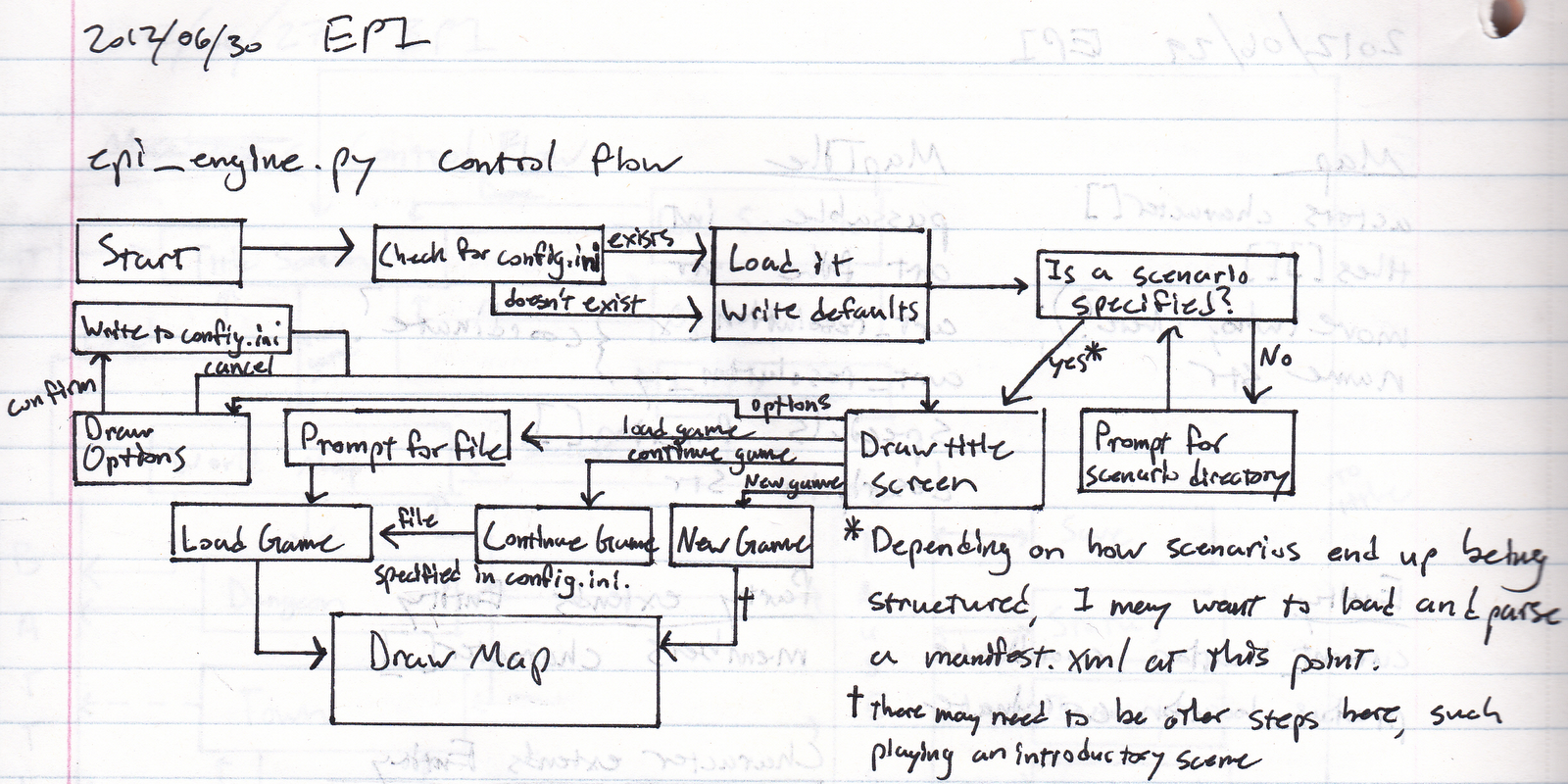
So I wanted to write a class that would take interpret an XML map specification and draw it to the screen.  Well, it didn't make much sense to me to dive right into without any context, so I sat down with a pen and a ruler and drew another flowchart.  This flowchart goes into detail about the steps the MGEET needs to go through before it draws a map:


I made this a couple of days before I wrote the last post, so some things don't line up.  In particular the "manifest.xml" I mention here is actually the "global.xml" I talked about last post.

I implemented everything up to "Is a scenario specified?"  Then I hard-coded a scenario into my config.ini and pretended that "Is a scenario specified?" pointed straight to "Draw map".  I'm not really concerned about the title screen right now because I have bigger and more exciting things to do, like have things move around on the map and get into fights with each other.

config.ini is a simple flat file containing one "key = value" statement per line.  These are then parsed into a dictionary called engine_settings.  Currently, I have the keys resolution_x, resolution_y, bg_r, bg_g, bg_b, scenario_dir, and last_savegame implemented, although I will certainly add more keys as they become necessary.  Users aren't meant to modify config.ini directly.  Instead, I'll have an interface to changing config.ini from within the application.

This afternoon, as I was still without power, I went to Starbucks, ordered a Grande Decaf Iced Mocha Latte (henceforth "GDIML") because I figured I needed to patronize them in exchange for free internet and free power, and started coding.  Five hours of banging my head against PyGTK documentation and tutorials later, I had a class that would draw a map correctly, and a driver to make it go:

This is ugly because I tried to do Art.
Astute readers will have noticed that this is the same map I described in the XML example I gave last post.  Thrilling, I know.  Implementation wise, it makes neat use of object inheritance-- I wrote a MapWidget class which extends the gtk.DrawingArea class provided by PyGTK.  MapWidget basically combines gtk.DrawingArea with the Map class I wrote about earlier.  There's also a fair amount of coordinate geometry that goes into centering the map in the window, and figuring out which tiles are appropriate to draw based on where the player character is and how much window space the application has available to it.  I'll attach scans of my notes in a jump at the end of this post.

While I was implementing MapWidget, several modifications to the Map and MapTile classes became necessary.  In a nutshell, the classes now look like this:

  • Map
    • tileset - dictionary
    • tiles_resolution - OrderedPair
    • default - OrderedPair
    • actors - list
    • map - integer matrix
    • specials - dictionary
    • bg - (red, green, blue) tuple
  • MapTile
    • art_filename - string
    • passability - integer
    • pixel_buffer - gtk.gdk.Pixbuf
    • resolution - OrderedPair

Each Map keeps track of its tiles in its tileset dictionary, which is indexed by tile id.  The actual map matrix consists only of integers-- each tile can be accessed as Map.tileset[map[x][y]].  This technique, known as deduplication, saves a lot of memory as long as the tileset is small compared to the total number of tiles in the map (and this condition should pretty much always hold true).  I'm not really sure why both Maps and MapTiles keep track of their resolutions.  This is redundant, and I'll fix it when I feel like fixing little things.

It would be nice still to dynamically redraw the map every time the window is resized, and also maybe add a zoom feature.

Replacing my bad mspaint tile art with results from Google image searches for sand and stone textures has an immediate positive impact on the map's appearance:

Looking better!
A little creativity with the tileset definition goes a long way.  For my next trick, I'll use more than two tiles to create a beach:

The very essence of summer!
It's primitive, I know, but I hope I'm demonstrating that the returns scale with the amount of effort artists put in to creating environments.

With MapWidget more or less implemented, it's a good time to mention some pros and cons of the strictly tile-based system I've adopted.
  • Pros 
    • It's easy to implement.
  • Cons
    • It's fugly.
    • Character movement is unsmooth.
    • Tile-to-position ratio is approximately 1:1.
    • XML Maps are hard to manage.
    • One MapEntity per tile.
Tile-to-position ratio is ratio of tiles on the map to unique positions a character can be in.

A slightly better approach would be to define and draw maps using tiles, but rather than express MapEntity (look at EPI #6 if you don't remember these) locations in terms of MapTile coordinates, express them as pixel coordinates.  Then, if we give each MapEntity a "speed" (the number of pixels it moves at once), we solve many of the aforementioned cons:
  • Character movement becomes much smoother, since they move fractions of a tile at a time.
  • Tile-to-position ratio skyrockets-- (tile_res_x * tile_res_y)/speed:1.  With a 32x32 tiles and a speed of 2, this approach takes us from 1:1 to 512:1!
  • The increase in tile-to-position ratio also helps with managing XML Maps.  The above example essentially allows a designer to replace a 32x32 grid of tiles with a single tile!
  • Large tiles become more attractive-- they're bigger, more detailed, and you need to keep track of fewer of them to create a whole map.
The only real downside to this approach is that it's a little bit harder to implement.  And I do mean "little bit". It's really not that bad.  I'll probably take this approach as I start to worry about drawing MapEntitys later this week.

As promised, see below the break for the coordinate geometry notes I made by candlelight.  I know you all are probably very excited for this.

Monday, July 2, 2012

EPI #7: Maps, part 1

Three days, zero showers later, and I'm back in business!  And just in time, too, because I was about to run out of clean clothes.  Hygiene jokes aside, I did indeed manage to work through the power outage.

I've made it pretty clear thus far in the blog that I believe maps are a major component of RPGs.  It should come as no surprise to anyone, then, that I chose maps as a starting point for writing code.  I chose to build off the classes I outlined last time and write a class for rendering maps to the screen.

However, before I started writing code, I needed a way to describe the maps that will eventually become my input.  XML is a natural choice for what I'm trying to do, since it is both human- and machine-readable.  Although a more complicated scheme might lead to performance or space optimizations, I have no interest in pursuing one since it would just be harder to make sense of while debugging.  Also, I'm not operating under any particular performance or space constraints.

An XML map specification consists of three main parts: the tileset description, the map data, and any special events that apply to the map.  There's also a tag for a default location, which is where the map places any characters who aren't explicitly given a coordinate location.  XML for a simple map might look like this:


<map name='my_map'>
     <default x='1' y='1' />
     <tileset res_x='32' res_y='32'>
          <tile id='0' passability='0'>./content/test/tiles/test_0.png</tile>
          <tile id='1' passability='1'>./content/test/tiles/test_1.png</tile>
     </tileset>
     <data>
          <row>1,1,1,1,1,1</row>
          <row>1,0,0,0,0,1</row>
          <row>1,0,1,1,0,1</row>
          <row>1,0,1,1,0,1</row>
          <row>1,0,0,0,0,1</row>
          <row>1,1,1,1,0,1</row>
     </data>
     <special x='0' y='2'>GO TO my_map_2</special>
</map>


This is pretty straightforward.  The res_x and res_y attributes of the tileset element indicate the x and y resolutions of all the tiles therein.  A Map has exactly one tileset, and all tiles must share the same resolution.  The tiles do not, however, have to be square.  A tile element has id and passability attributes, and also specifies a file path.  I explained how passability works in a previous post, I'll get to id later when I talk about the data element, and the path identifies the location of the tile's image relative to the engine script.  Ids must be integers.  The data element consists of one or more rows, which each contain comma-separated tile ids.  Computerized color-by-numbers is a really good way to think of this.  The tileset section tells the engine which "colors" (really, images) go with which numbers, and the data section tells the computer what pattern to arrange them in.  Each row has to be the same size, but the map doesn't have to be square.  Finally, each special element identifies a (zero-indexed) map coordinate and specifies an special effect that happens there.  These are basically stubs at this point, since I haven't fleshed out the special effects system yet.

Two related thoughts come immediately to mind about this schema.  First, it's really easy for humans to read.  It makes intuitive sense.  Second, the data section is going to be an enormous pain in the ass to create by hand for maps that are tens or hundreds of rows or columns large.  This is probably a good time to mention that, although an editor application would be relatively straightforward to implement, I don't have any plans to write one right now.  My hands are full enough with game engine as it is.

One nice thing about XML is that since it's all text-based, which means it compresses really well.  One optimization I might be able to make to the engine later could be to enable it to deal directly with compressed files, thus reducing the size of scenarios.

Speaking of scenarios, this is only one part.  I haven't finalized the scenario hierarchy yet, but my thinking so far runs like so:  The root scenario directory, .../scenario_name, contains exactly one global.xml file, which describes various universal properties of the scenario, and many subdirectories, one for each distinct map in the scenario.  scenario_name/map_subdirectory will contain a map specification (which I described in this post), as well as NPC, item, and monster specifications, a subdirectory for audio resources (such as music and sound effects), and a subdirectory for graphical resources.

Saturday, June 30, 2012

EPI #6.5: Unplanned Posting Hiatus

So last night the worst non-hurricane storm in Virginia history rolled through my neighborhood, and I am without power.  No power means no router means no internet, so I won't be updating for a few days while the power company figures itself out.  Rest assured though, when the lights come back on, I'll have lots to update y'all about, since puny thunderstorms aren't enough to keep me from planning in notebooks and on graph paper!

(If anyone's wondering how I managed to post this, I'm at Panera, eating dinner.)

Friday, June 29, 2012

EPI #6: Classes

The brainstorming I did on Wednesday got me started on the right track as far as thinking about designing a game engine.  I didn't post yesterday because I spent the whole day hiking.  This blog is going to get a little bit more technical as my ideas crystallize further and I start writing code, so I apologize to those of you who are not hip to the Computer Science lingo.  However, don't get too disappointed, because there will still be a lot of work to do designing the actual game once the engine is ready.

I hinted on Wednesday that I will use an object-oriented approach to implementing my game engine.  I'm choosing this programming paradigm because it makes the most sense.  Games are broken up into multiple discrete functional units, and taking an object-oriented approach allows me to conceptualize and implement each of these different functional units separately.  This makes it easier both to translate my thoughts into code and to keep my project organized.  Honestly, keeping this whole thing organized is very likely going to be the hardest part of what I'm doing.

Some of you are probably curious about which programming language I'm going to use.  I have decided to use Python for the sole reason that I need to learn Python before I start my real job in July.  If I had other concerns, I might have made a different choice, e.g.:  C++ (if I were actually going to write a real game, as in one I could sell to people maybe); Java (if I were a masochist and/or concerned about portability); or PHP (if I wanted to use something I'm comfortable with).  For graphics, I'm probably going to use PyGTK, although I haven't really explored my options there.

I've blogged before about how nearly all of the action in a JRPG takes place on the world map, on a town or dungeon map, or in a battle.  It happens that, from a coding standpoint, there's no reason to separate world maps from town or dungeon maps.  In practice, the world, town, and dungeon maps will probably all be designed very differently from each other, but the engine needs to support the same set of features from all three.  So in practice I've reduced the number of locations in which action happens from three to effectively two.  Therefore, the first class I'm going to design will be the Map class:
  • Map
    • name: string
    • actors: MapEntity[]
    • tiles: MapTile[][]
    • move(Character, integer)
  • OrderedPair
    • x: integer
    • y: integer
  • MapTile
    • description: string
    • passability: integer
    • art_path: string
    • art_resolution: OrderedPair
    • specials: string[]
So then, the really important parts.  A Map will consist of a matrix of MapTiles and an array of MapEntitys.  Maps will also be responsible for moving their different actors around.  A MapTile, in turn, consists of the file system path to the corresponding art and an array of special event definitions.  MapTile "passability" will make sense when I talk about MapEntitys:
  • MapEntity
    • current_location: OrderedPair
    • last_location: OrderedPair
    • control: Intelligence
  • Party extends MapEntity
    • members: Character[]
    • travel_power: integer
  • Character
    • (statistics)
    • (equipment)
    • (abilities)
    • current_HP: integer
    • maximum_HP: integer
Above are classes that describe things that act on the map.  MapEntitys keep track of their present and immediate past locations, Partys are collections of Characters, and Characters are the bread-and-butter of RPGs.  Party travel_power is compared against MapTile passability to determine whether or not a Party can move to a particular tile.  If travel_power >= passability, the move is successful.  Intelligence will be an interface that prescribes methods by which MapEntitys will make decisions.  There will be several different implementations of this interface, representing AIs, humans, and maybe one day even networked players.  Class properties in parentheses are things I haven't yet completely thought out that need to exist.

When you're planning a software development project, there is always more planning you can do.  But what I've done and blogged about so far is probably enough for me to start writing code.  I haven't really been talking about it, but when I think about class design, I also think about how the classes will interact with each other and the main game engine execution thread.  So now I have a pretty clear idea of how these pieces will fit together to generate a map with a figure on it that moves around in response to input.

"But Zach!" you say, "You haven't talked about how designers will create content, or how that content will be interpreted by the game engine!  Surely you'll need some content to test your code as you write it?"  Yes. I will.  You've made an astute observation, dear reader.  And you've raised a question that will be answered in a later post.  In another later post, I'll get into the details of how these lovely classes interact with the main game engine execution thread.  Maybe I'll even abbreviate that MGEET in the future, since I can't think of anything better to call it.